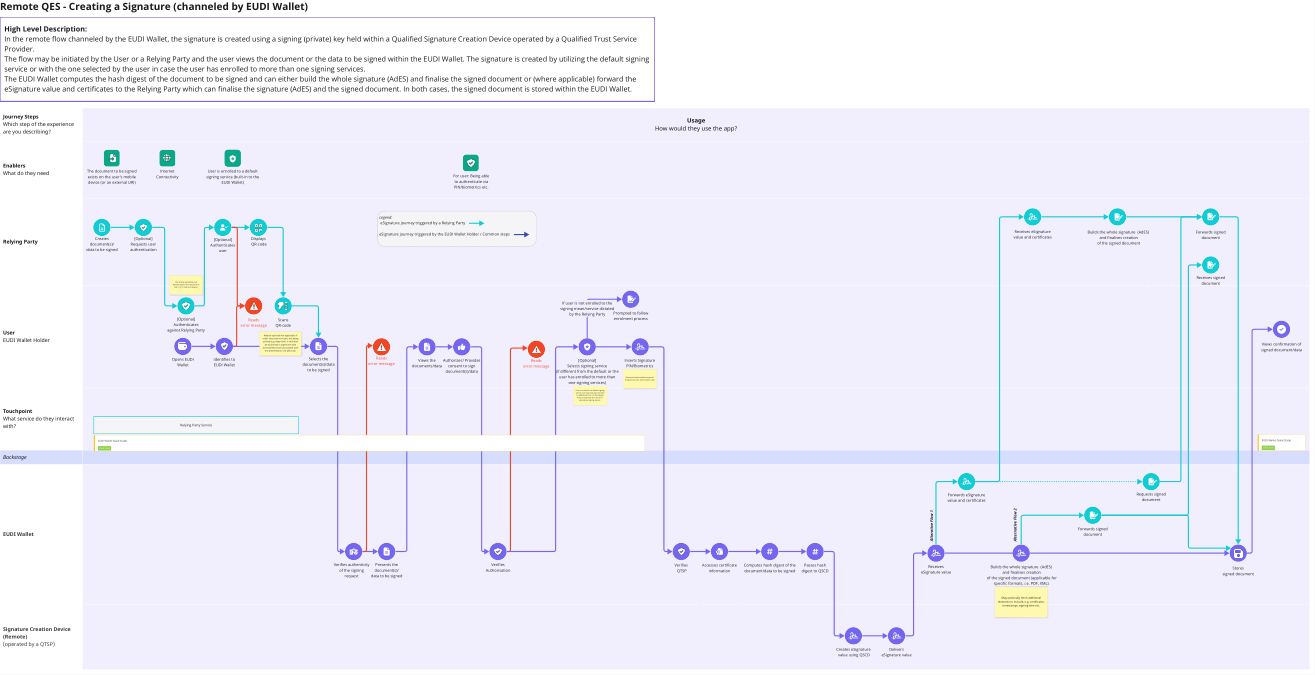
Remote QES - Creating a Signature (channeled by EUDI Wallet)
High Level Description:
In the remote flow channeled by the EUDI Wallet, the signature is created using a signing (private) key held within a Qualified Signature Creation Device operated by a Qualified Trust Service
Provider.
The flow may be initiated by the User or a Relying Party and the user views the document or the data to be signed within the EUDI Wallet. The signature is created by utilizing the default signing
service or with the one selected by the user in case the user has enrolled to more than one signing services.
The EUDI Wallet computes the hash digest of the document to be signed and can either build the whole signature (AdES) and finalise the signed document or (where applicable) forward the
eSignature value and certificates to the Relying Party which can finalise the signature (AdES) and the signed document. In both cases, the signed document is stored within the EUDI Wallet.
Journey Steps
Usage
Which step of the experience
are you describing?
How would they use the app?
Enablers
The document to be signed Internet
Internet User is enrolled to a default
What do they need Connectivity
ForFor
user:
user: Being
Being ableble
exists on the user's mobile Connectivity signing service (built-in to the
to authenticate via
device (or an external URI) EUDI Wallet) to PIN/biometrics
authenticate etc.via
PIN/biometrics etc.
Legend:
eSignature journey triggered by a Relying Party
Builds the whole signature (AdES)
Receives eSignature Builds the whole signature (AdES) Forwards signed
eSignature journey triggered by the EUDI Wallet Holder / Common steps and finalises creation
Creates Requests
[Optional]
user Displays value and certificates and finalises creation document
Authenticates
[Optional] of the signed document
Relying Party document/data
document(s)/ authentication
Requests user QR-code of the signed document
Authenticates
user
data
to to
bebe
signed
signed authentication user
Receives signed
Receives signed
The 'Online Identification & document
document
Authentication' flow described in
ARF v1.2.0' shall be followed.
If user is not enrolled to the
signing mean/service dictated
by the Relying Party Prompted to follow
[Optional]
Authenticates Reads Scans enrolment process
Authenticates
against Relying Party error message QR-code
against Relying Party
User May be optional/not applicable if
EUDI Wallet Holder other interactions means are being
utilised (e.g. deep-link). It shall also
be examined in alignment with Views confirmation of
accessibility issues associated with
the presentation of a QR-code. signed document/data
Opens EUDI Authenticates
Identifies to Selects the the
Selects Reads Selects signing service
Views the Authorizes/ Provides Reads [Optional] Inserts
InsertsSignature
Signature
Wallet inEUDI
EUDIWallet
Wallet document/data to
document(s)/data error message (QTSP) (note: may be
documents/data
document/data consent to sign error message Selects signing service PIN/Biometrics
PIN/Biometrics
be to
signed
be signed dictated by the Relying
document(s)/data
document/data (if different from the default or the
Party within the QR-code)
user has enrolled to more than May be already handled as part of
the previous user authorisation step
one User
signing services)
may be asked to select
signature format, if applicable and is
notUser
indicated by thetoRelying
is enrolled Party.
a default signing
service, but may have also enrolled
to additional ones, or the Relying
Party may dictate the use of an
alternative signing service.
Touchpoint
What service do they interact
with? Relying Party Service
EUDI Wallet (Valid State) EUDI Wallet (Valid State)
Valid State Valid State
Backstage
Forwards eSignature Requests signed
Forwards eSignature Requests signed
value and certificates document
value and certificates document
Alternative Flow 2
Alterative Flow 1
Forwards
Forwards
signed
signed
EUDI Wallet document
document
Verifies authenticity Presents the Verifies Verifies
Verifies Accesses certificate Computes hash digest of the Passes hash Builds the whole signature (AdES)
Receives Builds the whole signature (AdES) Stores
ofofRelying
the signing
Party document/data
document(s)/ to Authorisation QTSPQTSP information document/data to be signed digest to QSCD and finalises creation
eSignature value and finalises creation signed document
request databe
tosigned
be signed of the signed document (applicable for
of the signed document (applicable for
specific formats, i.e. PDF, XML)
specific formats, i.e. PDF, XML)
May optionally fetch additional
May optionally
elements fetch
to include, e.g.additional
certificates,
elements to include,
,timestamps, e.g. time
signing certificates,
etc.
timestamps, signing time etc.
Signature Creation Device
(Remote)
(operated by a QTSP)
Retrieves certificate Creates eSignature Delivers
information value using QSCD eSignature value