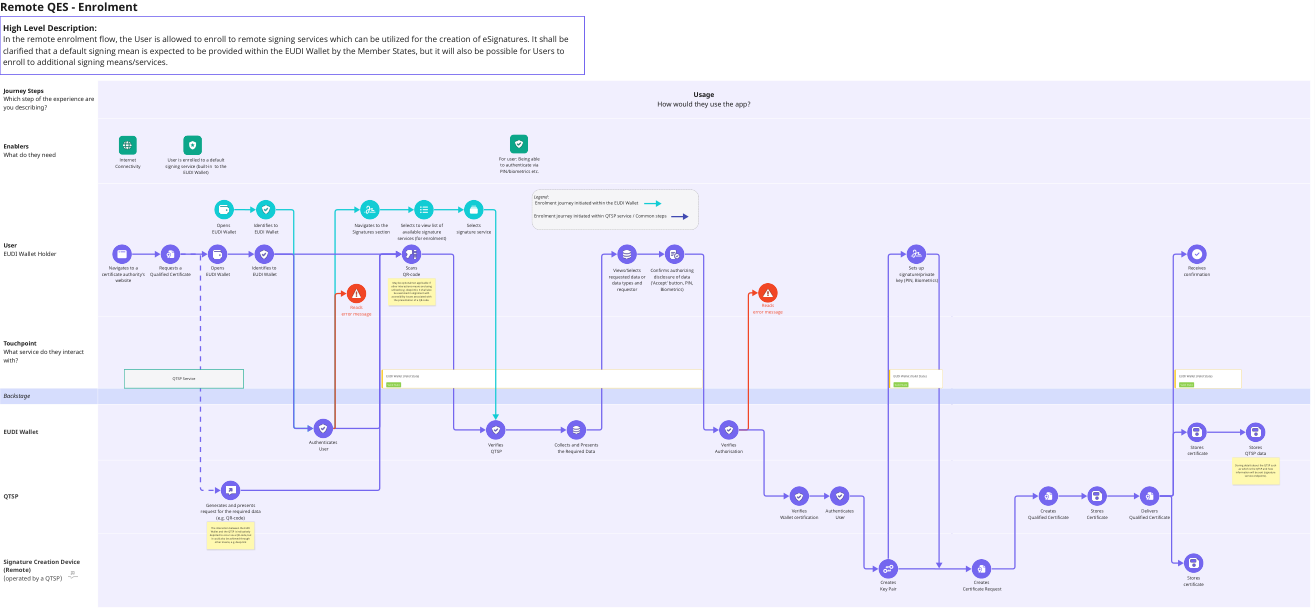
Remote QES - Enrolment
High Level Description:
In the remote enrolment flow, the User is allowed to enroll to remote signing services which can be utilized for the creation of eSignatures. It shall be
clarified that a default signing mean is expected to be provided within the EUDI Wallet by the Member States, but it will also be possible for Users to
enroll to additional signing means/services.
Journey Steps
Usage
Which step of the experience are
How would they use the app?
you describing?
Enablers
What do they need
Internet
Internet User is enrolled to a default For user: Being able
Connectivity
Connectivity signing service (built-in to the to authenticate via
EUDI Wallet) PIN/biometrics etc.
Legend:
Enrolment journey initiated within the EUDI Wallet
Enrolment journey initiated within QTSP service / Common steps
Opens Identifies to Navigates to the Selects to view list of Selects
EUDI Wallet EUDI Wallet Signatures section available signature signature service
services (for enrolment)
User
EUDI Wallet Holder
Navigates to a Requests a Opens Identifies to Scans SetsSets
up up Receives
Views/Selects Confirms authorizing
certificate authority's Qualified Certificate EUDI Wallet EUDI Wallet QR-code signature/private
signature/private confirmation
requested data or disclosure of data
website keykey
(PIN, Biometrics)
(PIN, Biometrics)
May be optional/not applicable if data types and ('Accept' button, PIN,
other interactions means are being
utilised (e.g. deep-link). It shall also requestor Biometrics)
be examined in alignment with
accessibility issues associated with
the presentation of a QR-code.
Reads Reads
error message error message
Touchpoint
What service do they interact
with?
EUDI Wallet (Valid State) EUDI Wallet (Valid State) EUDI Wallet (Valid State)
QTSP Service
Valid State Valid State Valid State
Backstage
EUDI Wallet
Authenticates
Verifies Collects and Presents Verifies
User Stores Stores
QTSP the Required Data Authorisation
certificate QTSP data
Storing details about the QTSP such
as which is the QTSP and how
information will be sent (signature
service endpoints).
QTSP
Generates and presents
request for the required data Verifies Authenticates Creates Stores Delivers
(e.g. QR-code) Wallet certification User Qualified Certificate Certificate Qualified Certificate
The interaction between the EUDI
Wallet and the QTSP is indicatively
depicted to occur via a QR-code, but
it could also be achieved through
other means, e.g. deep-link
Signature Creation Device
(Remote)
(operated by a QTSP) Stores
Creates Creates certificate
Key Pair Certificate Request